
Usage#
In order to set up machine-to-machine authentication for a client, the following steps need to be performed:
Issue Service Key#
A user that has already authenticated to Plone using regular means, and has
the ftw.tokenauth: Manage own Service Keys permission, can issue service
keys for their account via the @@manage-service-keys view
(Manage Service Keys action in personal tools menu).
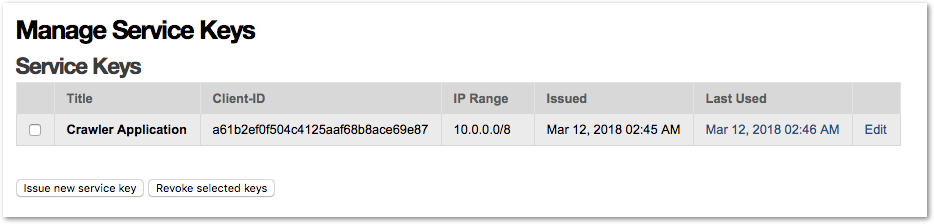
They need to issue a service key that is then displayed exactly once for download, and store the private key in a safe location accessible to the client that will use it.
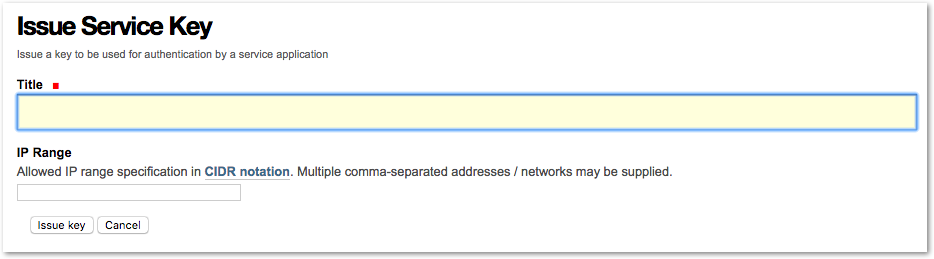
IP range restrictions_ may also be defined when issuing a key.
TODO: Document Key revocation.
Token request (exchange JWT grant for an access token)#
The client then makes a token request to the token_uri with the JWT grant
it created.
This request needs to be a POST request with
Content-Type: application/x-www-form-urlencoded and a request body that
contains the form encoded parameters.
Two parameters are required:
Name |
Description |
|---|---|
grant_type |
Must always be |
assertion |
The JWT authorization grant |
The token endpoint will then respond with a token response containing the access token:
{
  "access_token": "<token>",
  "expires_in": 3600,
  "token_type": "Bearer"
}
The response will be of Content-Type: application/json and contain a JSON
encoded body.
Python Example:
import requests

GRANT_TYPE = 'urn:ietf:params:oauth:grant-type:jwt-bearer'

payload = {'grant_type': GRANT_TYPE, 'assertion': grant}
response = requests.post(service_key['token_uri'], data=payload)
token = response.json()['access_token']
TODO: Document error responses for token requests
Use access token to authenticate requests#
The client can then use the access token to authenticate requests. The token
needs to be sent in the HTTP Authorization header as a Bearer token.
Once the token expires, the client must create a JWT authorization grant again, and request a new access token.
Python Example:
with requests.Session() as session:
    session.headers.update({'Authorization': 'Bearer %s' % token})
    response = session.get('http://localhost:8080/Plone/')
    # ...
If the token used by the client is expired, the server will respond with an error response:
{
  "error": "invalid_token",
  "error_description": "Access token expired"
}
The client should then sign another JWT authentication grant, request a new token, and re-dispatch the failed request with the original parameters, and the new token.
Advanced use#
This section covers some more advanced settings and functionality of
ftw.tokenauth.
IP range restrictions#
When issuing a key, IP range restrictions may be defined that limit from what source IP address access tokens tied to this key may be used.
Changes to IP range restrictions for a given key are effective immediately, and also affect already issued tokens tied to this key.
IP ranges may be specified as a single IP address or as a network in
CIDR notation <https://en.wikipedia.org/wiki/Classless_Inter-Domain_Routing#CIDR_notation>_
using the slash-suffix.
Multiple ranges may be provided in comma-separated form.
Examples of valid IP range specifications:
192.168.1.1192.168.0.0/16192.168.1.1, 10.0.0.0/8
Authentication attempts from an unauthorized source IP address are logged server side, but not indicated to the client in any particular way - authentication is simply not performed.
Impersonation#
Impersonation allows to authenticate as an arbitrary user instead of the user who issued the service key. This is useful if e.g. an application needs to act in the context of different users.
To be able to impersonate another user the service key user needs the
permission ftw.tokenauth: Impersonate user. By default this permission is
granted to the Manager role only. Be aware that with this permission a user
is allowed to impersonate users with higher privileges and thus in fact gets
all the permissions of the highest privileged user in the system.
To impersonate a user pass his userid or loginname instead of the userid
of the service key user with the sub claim in the JWT token when
requesting an access token.
Usage logs#
In the "Manage Service Keys" view, the last use of a key to issue access tokens is listed in the "Last Used" column. Clicking on this timestamp displays a detailed log of most recent uses of the key.
By default, these logs list the uses of the key in the last 7 days (the usage log retention period can be configured as a property on the PAS Plugin via the ZMI).
The log entry with the most recent use of a key is always retained, while the other log entries are cleaned out if they're expired (cleanup happens whenever a any new access token is issued).
The logs don't show use of access tokens to authenticate, but instead they show every instance where JWT authentication grants signed with this key were used to obtain a new access token.